Vimail Vimail
  • en_US
    vi
  • Home
  • Features
  • Pricing
  • Document
  • News
  • Contact
Log in
Vimail Vimail
  • Home
  • Features
  • Pricing
  • Document
  • News
  • Contact
  • Log in
  • en_US
  • vi

Register

3
  • Instructions for registering a vimail account
  • Instructions for purchasing additional emails
  • Team

For Beginners

1
  • Steps needed to master Vimail

Email By Domain Name

1
  • Instructions for registering email by domain name

Contact List

8
  • Instructions for creating your contact lists manually “Contact Lists”
  • Instructions for importing CSV file of customer data into Vimail “Contact Lists”
  • Instructions for adding customer tags to contact lists
  • How to create a “Suppression Lists”
  • Instructions for creating “Exclusions Lists”
  • Instructions for creating “Segments” for contact lists
  • Export your contact list
  • GDPR Compliance

Email Marketing

8
  • Instructions for sending marketing emails using vimail “Broadcasts”
  • Instructions for sending traditional text marketing emails “Broadcasts”
  • Instructions for sending marketing emails using HTML file “Broadcasts”
  • How to use vimail email template builder
  • Instructions for sending test emails
  • What is a preheader?
  • Email footer
  • Instructions for the feature of limiting the number of emails sent by minute, hour, day "Domain Throttles"

Forms & Popups

3
  • Instructions on how to create forms and popups to collect customer information “Forms”
  • Instructions for using the form designer and Popup to collect customer information
  • How to Insert Forms and Vimail Popups into WordPress Website

Customer Funnel

2
  • Instructions for creating an automatic email marketing process “Funnel”
  • A/B Testing

SMTP & API

2
  • Instructions for creating an API connection to connect vimail with your website or application
  • Instructions for creating an SMTP connection to connect vimail to your website, application

Customer Support

4
  • How to contact support
  • Change password
  • Forgot Password
  • Accepted payment methods
View Categories
  • Home
  • Document
  • Contact List
  • Instructions for creating your contact lists manually “Contact Lists”

Instructions for creating your contact lists manually “Contact Lists”

Creating a contact list is a must before sending marketing emails.

To create a new contact list to start your email marketing campaign, please see the following instructions:

Step 1. Access https://my.vimail.vn/ and follow the instructions #
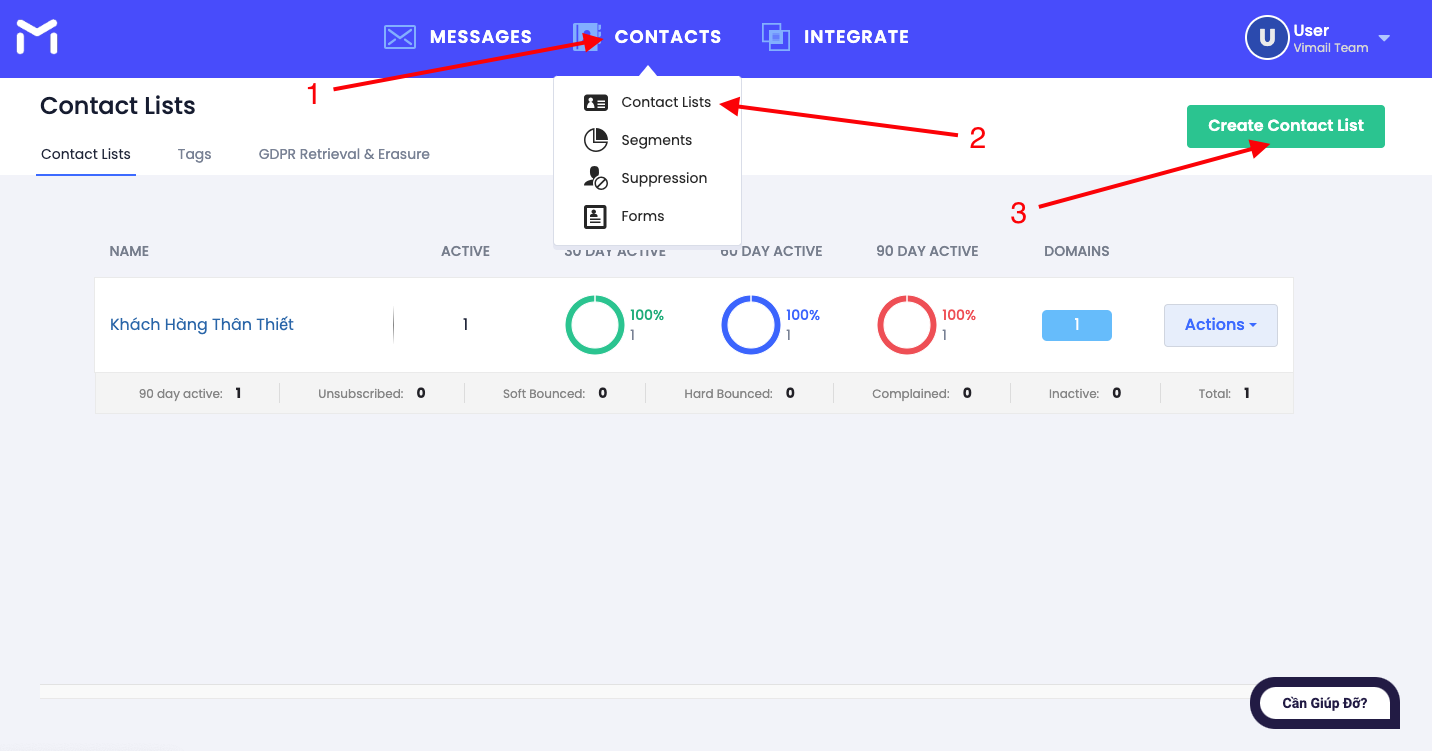
Instructions for creating your contact list

Step 2. Enter the required data #

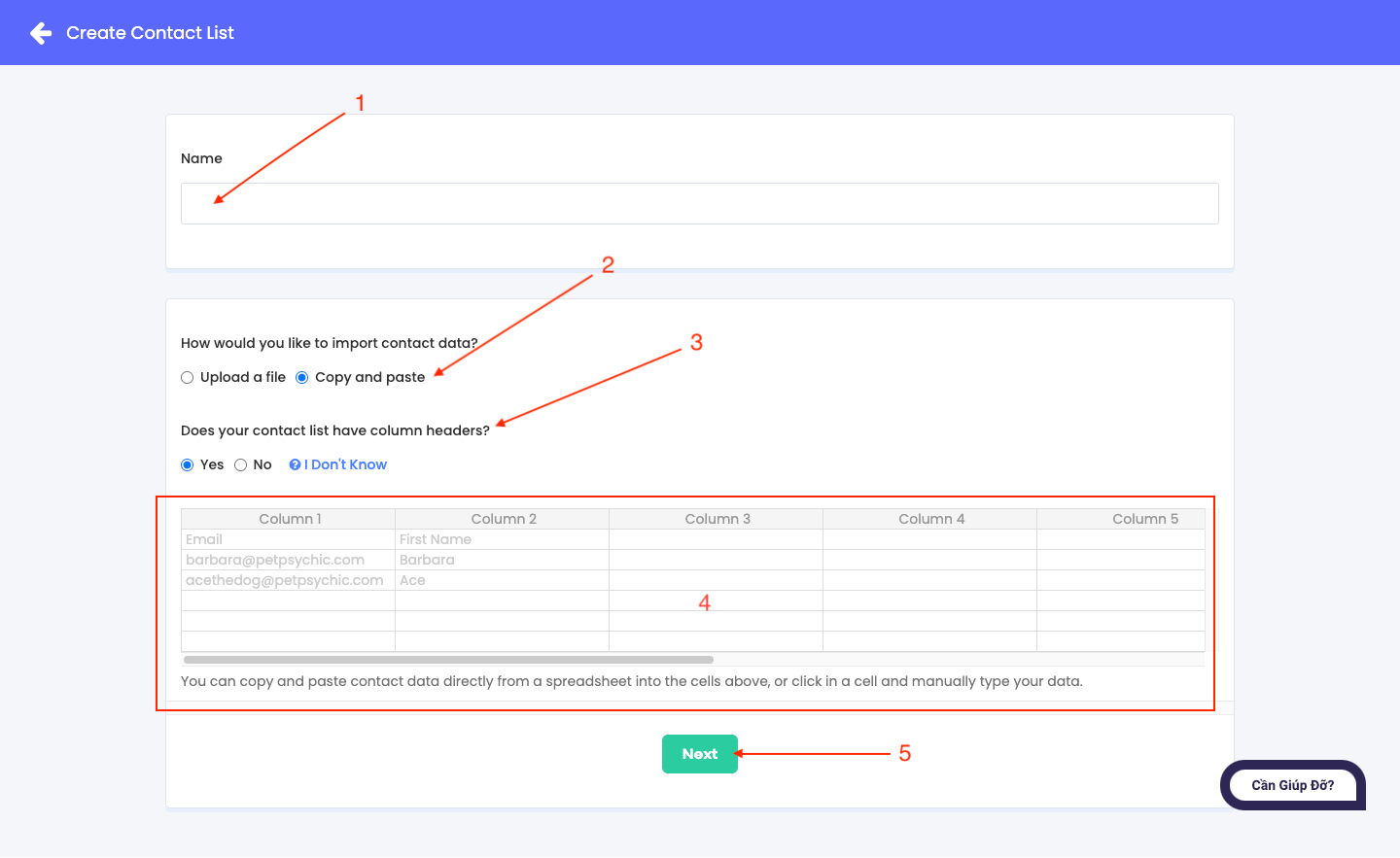
In this step, there are 2 ways to import contact list data. You can import by uploading the CSV file you have available or copy - paste the data into the box as below.

In this tutorial we only guide you how to enter data manually by copying and pasting data into the box as below or manually filling in the data.

If you have a CSV file of customer data available, please see the following instructions on how to upload a CSV file of customer data into Vimail: Instructions for importing CSV files of customer data into Vimail

  •  1. Name the data list
  • 2. Choose how to import the data list. In this tutorial, choose Copy and Paste.
  • 3. Does this list have a subject line?
  • 4. Manually enter data into the cells or you can copy-paste available data into the cells. Each data is a separate column.
  • 5. After entering, click continue

Instructions for creating your contact list

Step 3. Select the options for the system to classify the data #

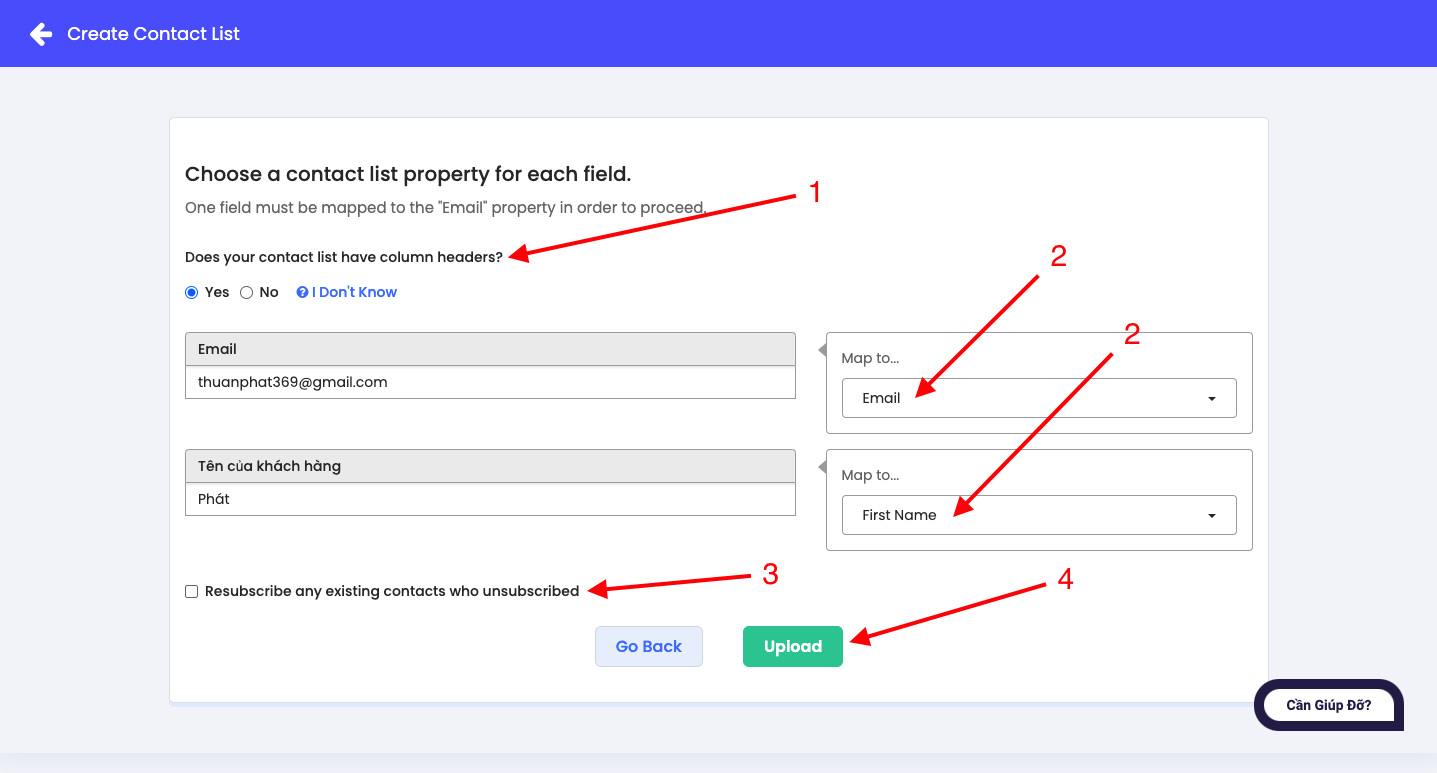
  • 1. Does the data list file you just imported have a header?
  • 2. Select or create a new data classification that matches the data file you just imported.
  • 3. Is there a way to re-enter users who have opted out of receiving mail?

In step 3, we recommend that you do not check the box to re-enter customer data after the customer refuses. Because when customers refuse to receive emails in previous email marketing campaigns, it means that customers are not interested in the field that you are working in, are doing business. If you intentionally spam them and continue to send emails, they may report it to the mail server. After being reported, it will increase the "Complained" rate, which can lead to locking your vimail account.

  • 4. Click the button to upload data to the system
Instructions for creating your contact list

Step 4. Data has been uploaded to the system. #

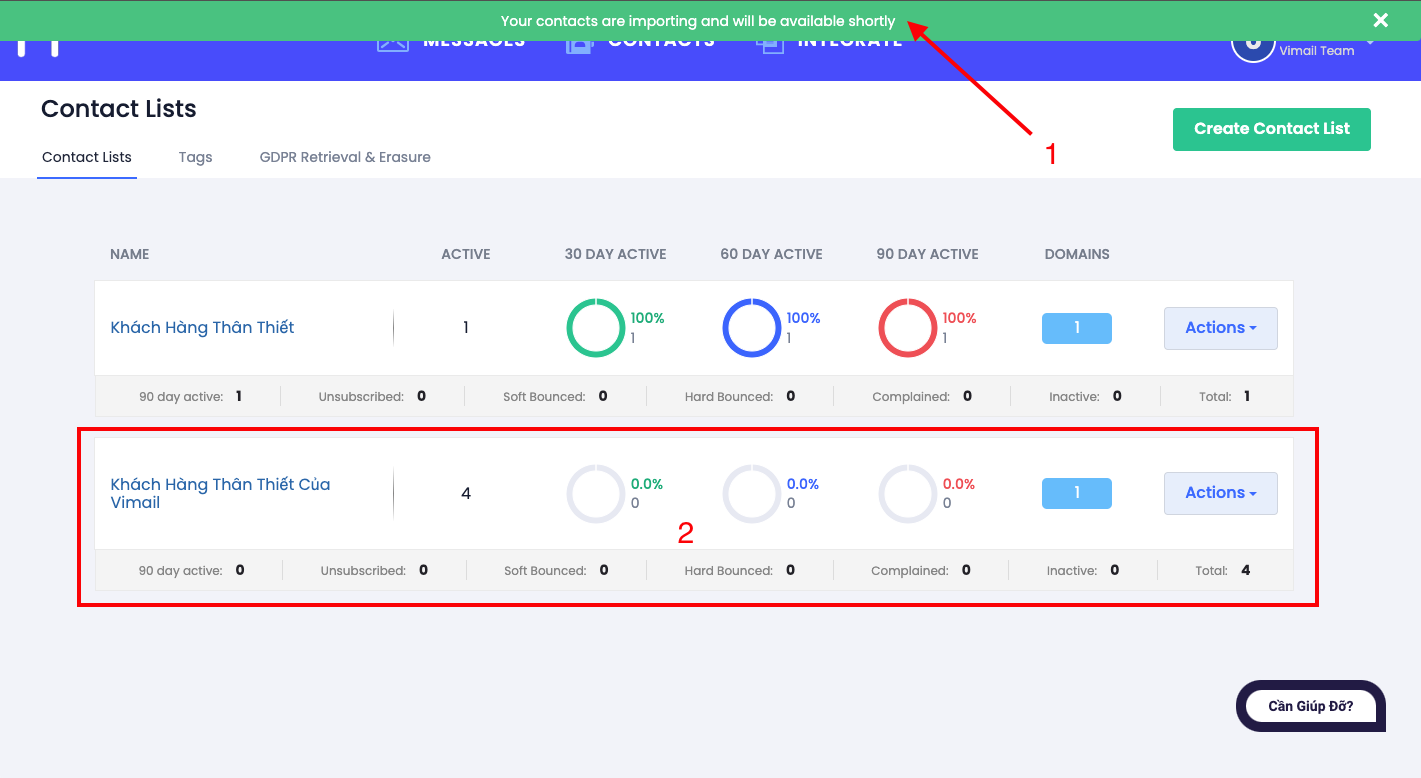
  1. You will receive a notification that the data has been successfully uploaded to the system.
  2. You can check your contact list and your contact statistics.
Instructions for creating your contact list

Updated on 16/08/2024

What are your Feelings

  • Happy
  • Normal
  • Sad

Share This Article :

  • Facebook
  • X
  • LinkedIn
  • Pinterest
GDPR ComplianceInstructions for importing CSV file of customer data into Vimail “Contact Lists”
Index
  • Step 1. Visit https://my.vimail.vn/ and follow the instructions
  • Step 2. Enter the required data
  • Step 3. Select the options for the system to classify the data
  • Step 4. Data has been uploaded to the system.
Image link
Do you want to do email marketing?
Try Vimail for free now!
Try It Free
Vimail

Email Marketing software is simple, fast, effective and economical.

Category
About Us
Features
Document
Contact
Policy
Terms of Service
Privacy Policy
Cookie Policy
Refund Policy

Vimail © 2024

We've detected you might be speaking a different language. Do you want to change to:
vi Tiếng Việt
vi Tiếng Việt
en_US English
Change Language
Close and do not switch language
cookies By using this website, you agree to Cookie Policy. Close