Vimail Vimail
  • en_US
    vi
  • Home
  • Features
  • Pricing
  • Document
  • News
  • Contact
Log in
Vimail Vimail
  • Home
  • Features
  • Pricing
  • Document
  • News
  • Contact
  • Log in
  • en_US
  • vi

Register

3
  • Instructions for registering a vimail account
  • Instructions for purchasing additional emails
  • Team

For Beginners

1
  • Steps needed to master Vimail

Email By Domain Name

1
  • Instructions for registering email by domain name

Contact List

8
  • Instructions for creating your contact lists manually “Contact Lists”
  • Instructions for importing CSV file of customer data into Vimail “Contact Lists”
  • Instructions for adding customer tags to contact lists
  • How to create a “Suppression Lists”
  • Instructions for creating “Exclusions Lists”
  • Instructions for creating “Segments” for contact lists
  • Export your contact list
  • GDPR Compliance

Email Marketing

8
  • Instructions for sending marketing emails using vimail “Broadcasts”
  • Instructions for sending traditional text marketing emails “Broadcasts”
  • Instructions for sending marketing emails using HTML file “Broadcasts”
  • How to use vimail email template builder
  • Instructions for sending test emails
  • What is a preheader?
  • Email footer
  • Instructions for the feature of limiting the number of emails sent by minute, hour, day "Domain Throttles"

Forms & Popups

3
  • Instructions on how to create forms and popups to collect customer information “Forms”
  • Instructions for using the form designer and Popup to collect customer information
  • How to Insert Forms and Vimail Popups into WordPress Website

Customer Funnel

2
  • Instructions for creating an automatic email marketing process “Funnel”
  • A/B Testing

SMTP & API

2
  • Instructions for creating an API connection to connect vimail with your website or application
  • Instructions for creating an SMTP connection to connect vimail to your website, application

Customer Support

4
  • How to contact support
  • Change password
  • Forgot Password
  • Accepted payment methods
View Categories
  • Home
  • Document
  • Contact List
  • Instructions for creating “Exclusions Lists”

Instructions for creating “Exclusions Lists”

1. Exclusions Lists là gì? #

Exclusions Lists là danh sách liên hệ loại trừ.

Danh sách liên hệ loại trừ là tính năng bắt buộc. Tất cả liên hệ được thêm vào danh sách loại trừ sẽ được hệ thống tự động xóa khỏi chiến dịch email marketing bạn tạo trên Vimail.

Nếu bạn muốn tạo ra một danh sách gồm các liên hệ có thể chọn để loại trừ cho từng chiến dịch cụ thể, vui lòng xem hướng dẫn này: How to create a “Suppression Lists”

Ví dụ cho trường hợp sử dụng danh sách loại trừ:

You have:

  • – Một danh sách email các công ty đối thủ của bạn trên thị trường

Bạn muốn gửi email marketing cho khách hàng tiềm năng của bạn nhưng bạn không muốn gửi nhầm email marketing này cho những công ty đối thủ của bạn trên thị trường. Thì lúc này đây chính là tác dụng của danh sách loại trừ. Bạn cần thêm danh sách danh sách email các công ty đối thủ của bạn trên thị trường làm danh sách loại trừ để hệ thống sẽ tự động loại trừ các email này ra khỏi tất cả các chiến dịch email marketing của bạn.

2. Các bước để tạo danh sách loại trừ #

Step 1. Access https://my.vimail.vn/ and follow the instructions #
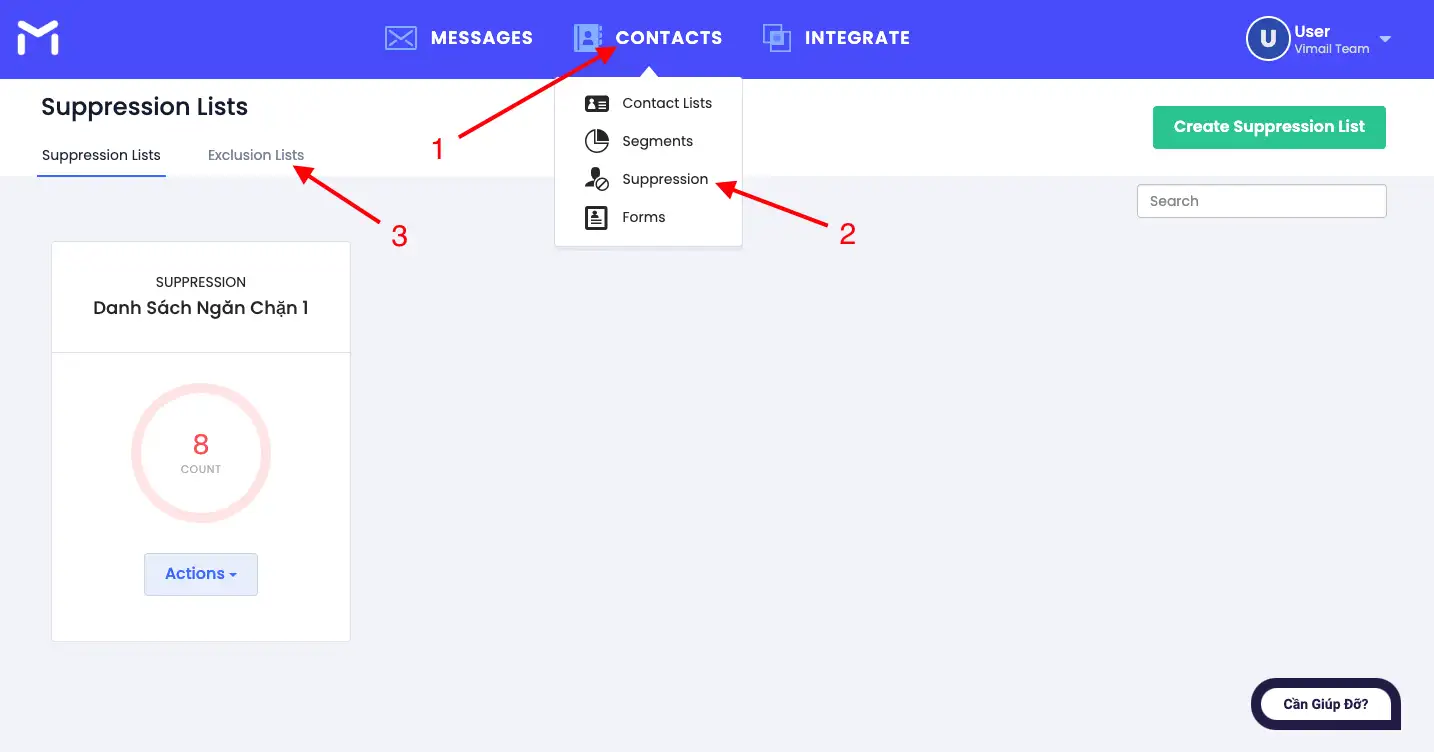
Hướng dẫn tạo danh sách liên hệ loại trừ “Exclusions Lists”

Bước 2. Thêm các email và tên miền vào danh sách loại trừ #

  1. Thêm email vào danh sách email không nên gửi
  2. Thêm email vào danh sách email độc hại
  3. Thêm tên miền vào danh sách không nên gửi email
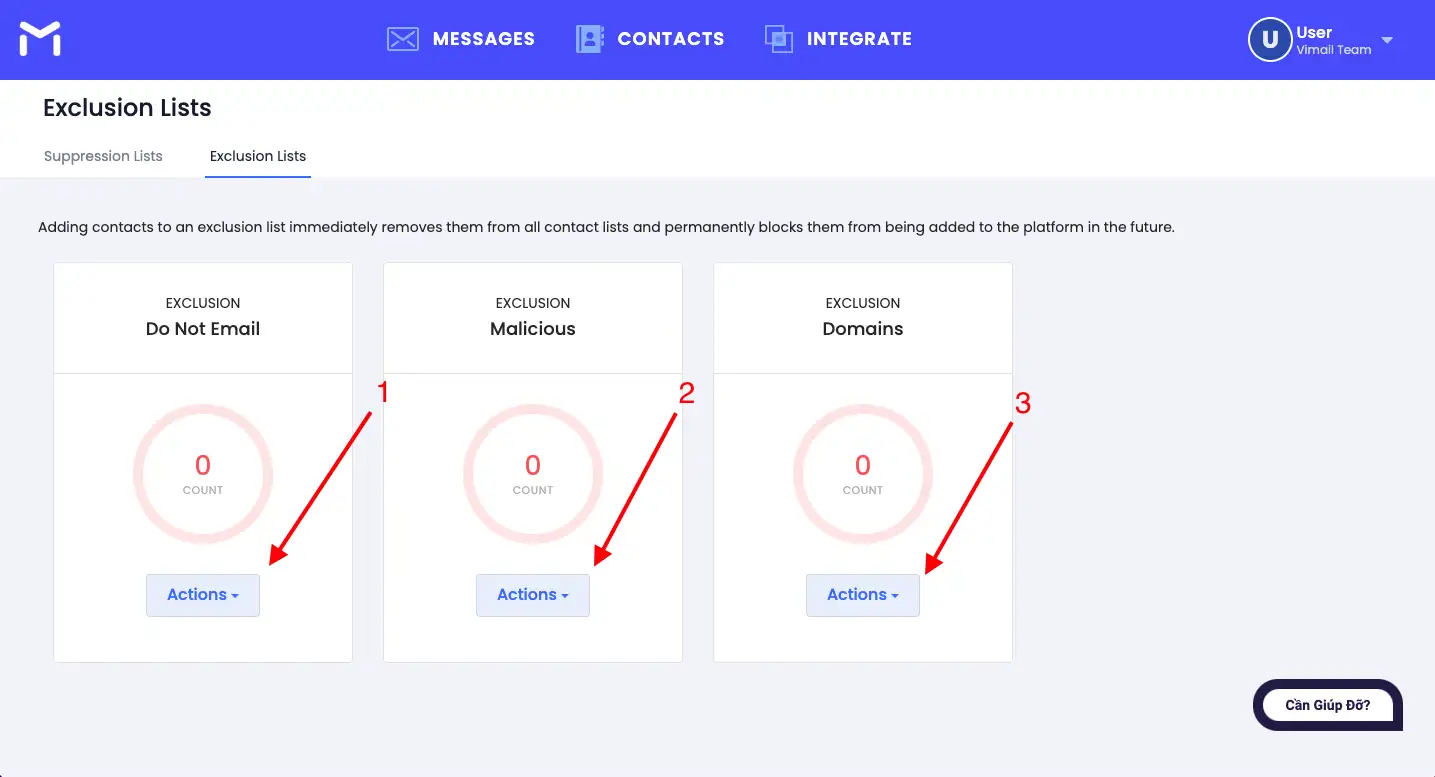
Hướng dẫn tạo danh sách liên hệ loại trừ “Exclusions Lists”

Bước 3. Xem thống kê các danh sách loại trừ #

Lưu ý: Hiện tại, không thể sửa lại danh sách loại trừ sau khi thêm.
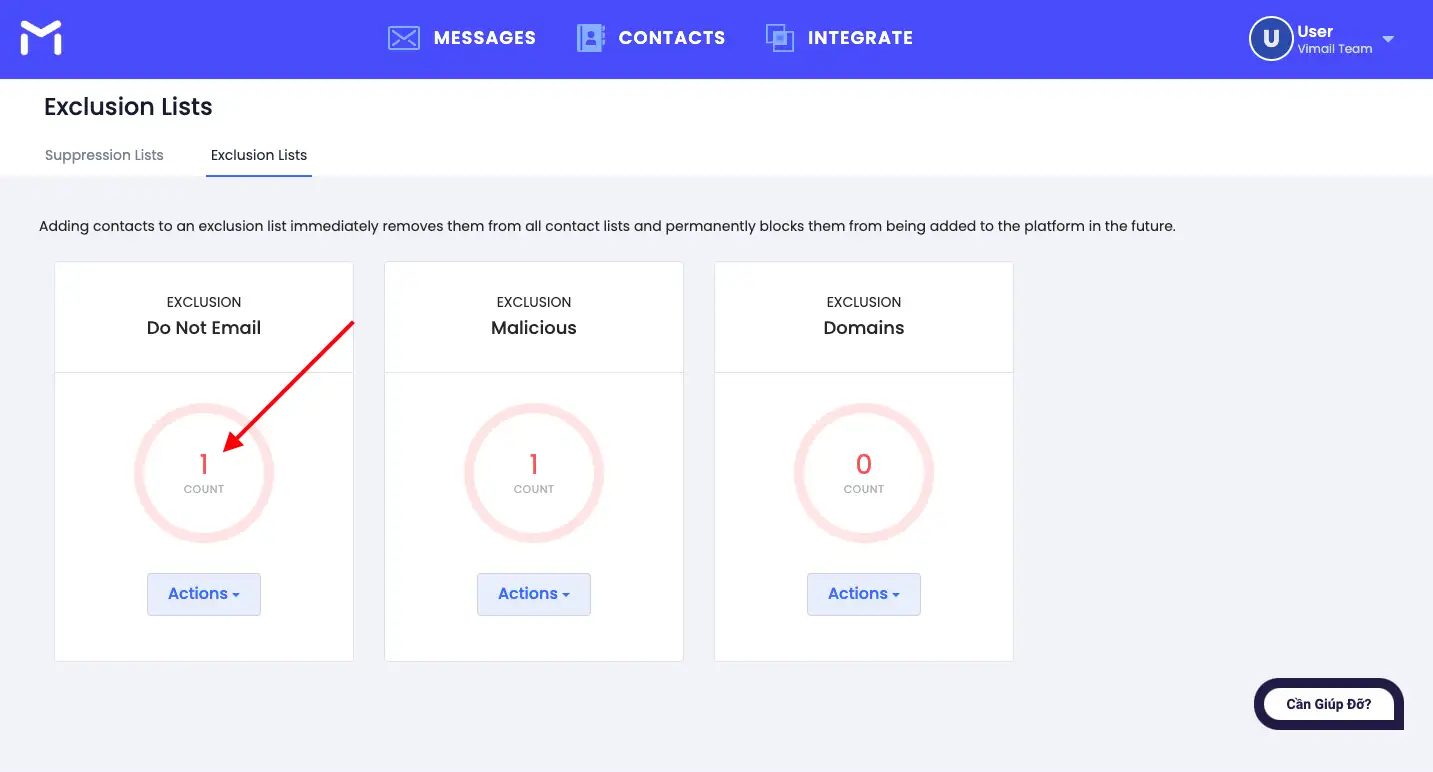
Hướng dẫn tạo danh sách liên hệ loại trừ “Exclusions Lists”

Updated on 19/08/2024

What are your Feelings

  • Happy
  • Normal
  • Sad

Share This Article :

  • Facebook
  • X
  • LinkedIn
  • Pinterest
How to create a “Suppression Lists”Instructions for creating “Segments” for contact lists
Index
  • 1. Exclusions Lists là gì?
  • 2. Các bước để tạo danh sách loại trừ
    • Step 1. Visit https://my.vimail.vn/ and follow the instructions
    • Bước 2. Thêm các email và tên miền vào danh sách loại trừ
    • Bước 3. Xem thống kê các danh sách loại trừ
Image link
Do you want to do email marketing?
Try Vimail for free now!
Try It Free
Vimail

Email Marketing software is simple, fast, effective and economical.

Category
About Us
Features
Document
Contact
Policy
Terms of Service
Privacy Policy
Cookie Policy
Refund Policy

Vimail © 2024

We've detected you might be speaking a different language. Do you want to change to:
vi Tiếng Việt
vi Tiếng Việt
en_US English
Change Language
Close and do not switch language
cookies By using this website, you agree to Cookie Policy. Close