Vimail Vimail
  • en_US
    vi
  • Home
  • Features
  • Pricing
  • Document
  • News
  • Contact
Log in
Vimail Vimail
  • Home
  • Features
  • Pricing
  • Document
  • News
  • Contact
  • Log in
  • en_US
  • vi

Register

3
  • Instructions for registering a vimail account
  • Instructions for purchasing additional emails
  • Team

For Beginners

1
  • Steps needed to master Vimail

Email By Domain Name

1
  • Instructions for registering email by domain name

Contact List

8
  • Instructions for creating your contact lists manually “Contact Lists”
  • Instructions for importing CSV file of customer data into Vimail “Contact Lists”
  • Instructions for adding customer tags to contact lists
  • How to create a “Suppression Lists”
  • Instructions for creating “Exclusions Lists”
  • Instructions for creating “Segments” for contact lists
  • Export your contact list
  • GDPR Compliance

Email Marketing

8
  • Instructions for sending marketing emails using vimail “Broadcasts”
  • Instructions for sending traditional text marketing emails “Broadcasts”
  • Instructions for sending marketing emails using HTML file “Broadcasts”
  • How to use vimail email template builder
  • Instructions for sending test emails
  • What is a preheader?
  • Email footer
  • Instructions for the feature of limiting the number of emails sent by minute, hour, day "Domain Throttles"

Forms & Popups

3
  • Instructions on how to create forms and popups to collect customer information “Forms”
  • Instructions for using the form designer and Popup to collect customer information
  • How to Insert Forms and Vimail Popups into WordPress Website

Customer Funnel

2
  • Instructions for creating an automatic email marketing process “Funnel”
  • A/B Testing

SMTP & API

2
  • Instructions for creating an API connection to connect vimail with your website or application
  • Instructions for creating an SMTP connection to connect vimail to your website, application

Customer Support

4
  • How to contact support
  • Change password
  • Forgot Password
  • Accepted payment methods
View Categories
  • Home
  • Document
  • Contact List
  • GDPR Compliance

GDPR Compliance

To comply with GDPR, your customers have the right to request that you retrieve their personal data that you have stored as well as to request that you delete it.

Below are instructions for exporting personal data and deleting personal data.

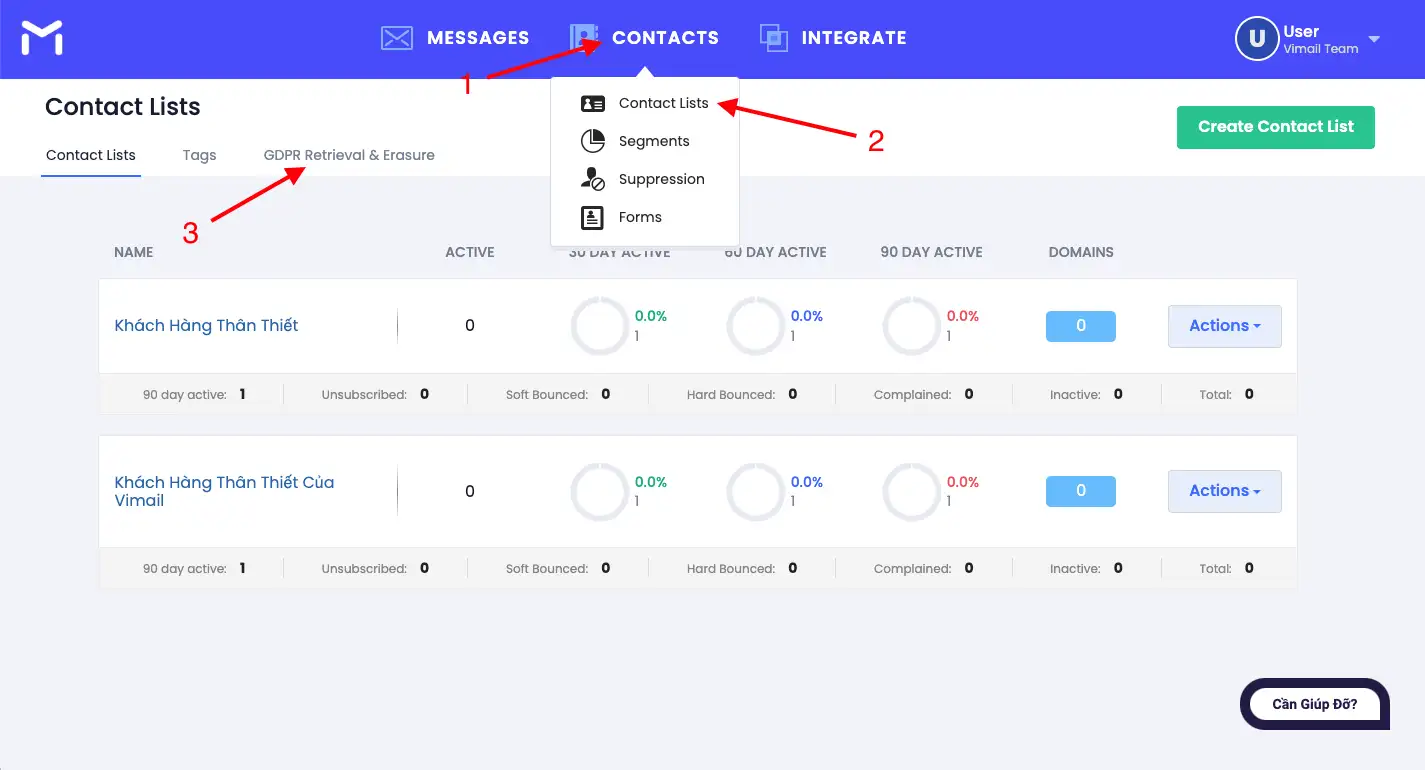
Step 1. Visit https://my.vimail.vn/ and follow the instructions #
Save drafts automatically

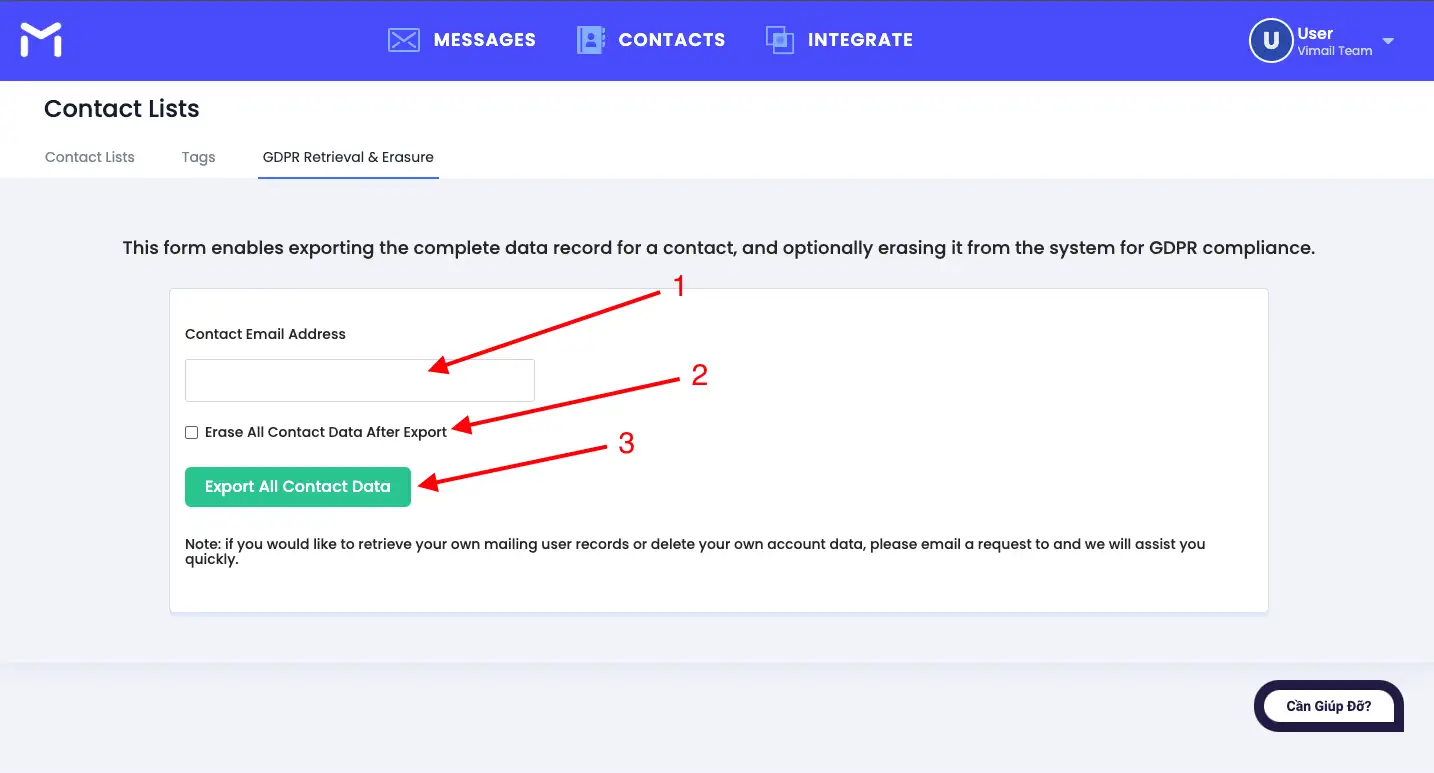
Step 2. Enter the required information #

  1. Email of customer whose data needs to be exported
  2. If you select this option, the customer data for that email will be deleted by the system after you export the data.
  3. Once done, press button number 3

Save drafts automatically

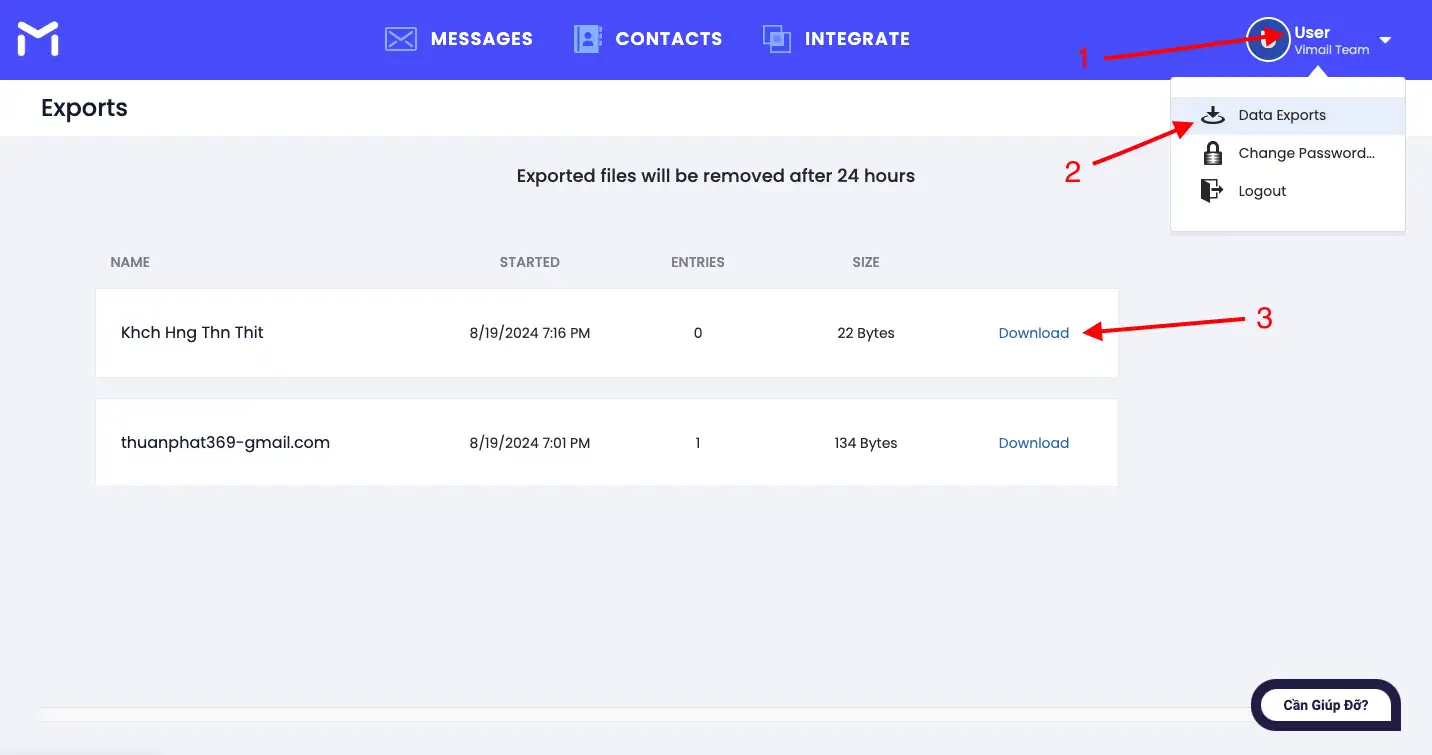
Step 3. Download the Zip file containing the customer's exported personal data #
Save drafts automatically

Updated on 19/08/2024

What are your Feelings

  • Happy
  • Normal
  • Sad

Share This Article :

  • Facebook
  • X
  • LinkedIn
  • Pinterest
Export your contact listInstructions for creating your contact lists manually “Contact Lists”
Index
  • Step 1. Visit https://my.vimail.vn/ and follow the instructions
  • Step 2. Enter the required information
  • Step 3. Download the Zip file containing the customer's exported personal data
Image link
Do you want to do email marketing?
Try Vimail for free now!
Try It Free
Vimail

Email Marketing software is simple, fast, effective and economical.

Category
About Us
Features
Document
Contact
Policy
Terms of Service
Privacy Policy
Cookie Policy
Refund Policy

Vimail © 2024

We've detected you might be speaking a different language. Do you want to change to:
vi Tiếng Việt
vi Tiếng Việt
en_US English
Change Language
Close and do not switch language
cookies By using this website, you agree to Cookie Policy. Close